How to Mount a TV on a Concrete Wall: DIY Guide

How to Mount a TV on a Concrete Wall: DIY Guide
Yes, you can securely mount a TV on a concrete wall — and it holds better than drywall when done right. The single most important step: use a hammer drill with masonry bits and the correct concrete anchors rated for your TV’s weight. Skip either one and you’re gambling with a $1,000+ TV.
Three things you need before you start:
- A hammer drill (or rotary hammer) with carbide-tipped masonry bits
- Concrete anchors matched to your TV’s weight (Tapcon screws, sleeve anchors, or wedge anchors)
- A VESA-compatible TV wall mount with a weight rating that covers your setup
Pro Tip: Add up the TV weight plus the mount weight, then choose anchors rated for at least 1.5× that combined number. A full-motion arm adds leverage that increases the stress on each anchor point.
Key Takeaways
Mounting a TV on a concrete wall is safe and durable when you match the anchor type to the wall substrate and TV weight, use a hammer drill, and test the install before walking away.
| Point | Details |
|---|---|
| Anchor choice by weight | Under 80 lb: Tapcon; 80+ lb: sleeve anchor; 90+ lb: wedge anchor or lag bolt. |
| Must-have tool | A hammer drill with carbide-tipped masonry bits; standard drills won’t work on concrete. |
| Safety margin | Choose a mount rated at least 1.5× the combined TV and mount weight. |
| Stucco and hollow block | Diagnose the substrate first; adhesives won’t hold a TV; drill into the structural layer. |
| Fixmovehaul option | Same-day TV mounting across Southwest Florida, including concrete, stucco, and exterior walls. |
Table of Contents
- What tools and materials do you need for a concrete wall TV mount?
- How do you choose the right anchor for concrete, cinder block, or stucco?
- Step-by-step: how to mount a TV on solid concrete
- How do cinder block, stucco, and exterior concrete change the approach?
- Safety checks, load testing, and mistakes to avoid
- What are the no-drill alternatives, and when do they actually work?
- When should you DIY, and when should you call a pro?
- Fixmovehaul handles the hard part for Southwest Florida homeowners
- Sources
What tools and materials do you need for a concrete wall TV mount?
Gather everything before you drill. Stopping mid-job to run to the hardware store is how mistakes happen.
Core tools:
- Hammer drill or rotary hammer (standard drills won’t cut it on concrete)
- Carbide-tipped masonry drill bits (sized to your anchor diameter)
- Torpedo or 4-foot level
- Socket wrench or ratchet set
- Shop vac or compressed air for clearing dust from holes
- Tape measure and pencil
Safety gear: Safety glasses, hearing protection, an N95 dust mask, and work gloves. Concrete dust is fine and gets everywhere.
Hardware:
- Tapcon concrete screws (blue, self-tapping into pilot holes)
- Sleeve anchors or wedge anchors (for heavier loads)
- Lag bolts with sleeve anchors (for very heavy or full-motion mounts)
- Washers and locknuts
Before buying anchors, confirm your mount’s VESA pattern (the bolt-hole spacing on the back of your TV) and its stated weight rating. Sleeve and wedge anchors offer higher pull-out strength than Tapcons and are the better call for heavy TVs or articulating arms.
Drill bit to anchor pairing table:
Pro Tip: Buy one extra masonry bit. Concrete is unforgiving on cutting edges, and a dull bit wanders. A fresh bit costs $5; a crooked hole costs you an hour.
How do you choose the right anchor for concrete, cinder block, or stucco?
The anchor that works on solid poured concrete is not always the right call on cinder block or stucco. Getting this wrong is the most common reason mounts fail.
Tapcon concrete screws thread directly into a pilot hole drilled in concrete or CMU. They’re DIY-friendly, fast to install, and offer solid pull-out resistance for most TV installations. The trade-off: they have lower shear strength than expansion anchors, so they’re best suited for TVs under 80 lb on solid concrete with a fixed or tilting mount.
Sleeve anchors expand as you tighten the nut, gripping the sides of the hole. They work in solid concrete and in the solid webs of cinder block. Pull-out strength is significantly higher than Tapcons, which is why they’re the go-to for heavier TVs and full-motion mounts.
Wedge anchors are the heavy-hitter. They require solid concrete (not hollow block) and deliver the highest pull-out capacity of the three. Overkill for a 55" TV on a fixed mount; exactly right for a 75" TV on a long-arm full-motion bracket.
Lag bolts with sleeve anchors combine a large-diameter bolt with an expansion sleeve. Use these when the mount manufacturer specifies them or when you’re dealing with a very heavy TV (90+ lb) and a full-motion arm with significant reach.
Anchor selection by TV weight:
| TV Weight | Recommended Anchor | Notes |
|---|---|---|
| Under 80 lb | Tapcon — or 1/4" | Fixed or tilt mount; solid concrete only |
| 80+ lb | Sleeve anchor — | Solid concrete or CMU web; tilt or full-motion |
| 90+ lb | Wedge anchor 1/2" or lag bolt + sleeve | Solid concrete only; full-motion or long-arm |

Pro Tip: Never rely on a single anchor point per side. Spread the load across at least two anchors per bracket hole cluster, and follow the mount manufacturer’s hole pattern exactly.
Step-by-step: how to mount a TV on solid concrete
Verify the wall and mark your layout
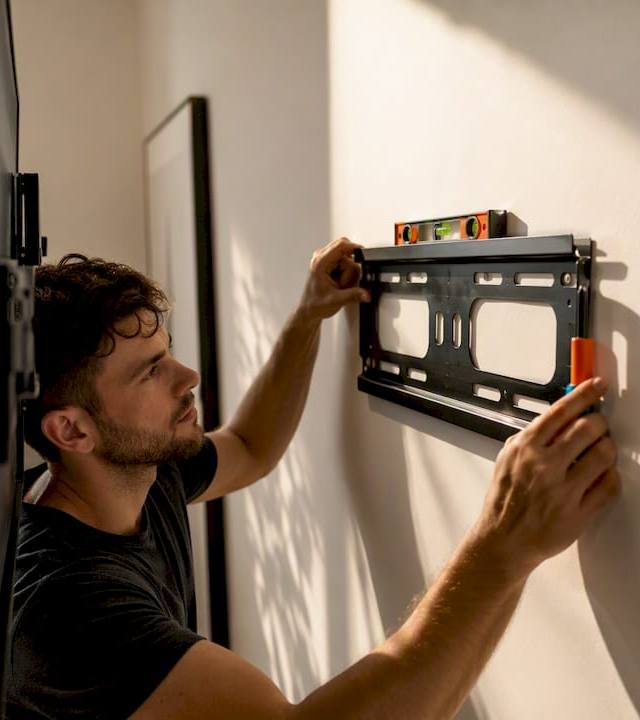
Tap the wall with your knuckle across the planned mount area. Solid concrete returns a dense thud; hollow block sounds noticeably different. Measure your viewing height: the center of the screen should land roughly 42–48 inches from the floor for seated viewing. Hold the mount bracket against the wall, use your level to confirm it’s plumb, then mark each hole center with a pencil.
Drill the pilot holes
Fit your hammer drill with the correct carbide-tipped masonry bit. Set the drill to hammer mode. Drill straight in, perpendicular to the wall, at a slow-to-moderate speed. Let the hammer action do the work — pushing hard just breaks bits. Drill to the depth your anchor requires, then clear the hole thoroughly with a shop vac or a few blasts of compressed air. Dust left in the hole reduces anchor grip.
A hammer drill with masonry bits is non-negotiable for concrete — ordinary drills wander, overheat, and rarely reach the depth you need.
Insert anchors and attach the mount
For Tapcons: drive the screw into the clean hole with a drill or socket until snug, then give it a firm quarter-turn. For sleeve or wedge anchors: insert the anchor, thread the nut, and tighten until the anchor expands firmly against the concrete. Manufacturer manuals typically list minimum embedment depth and maximum torque; if torque isn’t specified, stop at a firm, non-deforming feel. Over-torquing cracks the surrounding concrete and destroys the anchor’s grip.

Slide the mount plate onto the anchors, add washers and locknuts, and tighten evenly. Recheck level before fully seating everything.
Hang the TV and test
Two people for any TV over 55". Hook the TV onto the mount, engage all safety tabs or locking pins, then apply steady outward pressure with both hands. No movement means a solid install. Give it a gentle side-to-side wiggle. If anything shifts, stop and investigate before you walk away.

Do/Don’t quick reference:
| Do | Don’t |
|---|---|
| Clear hole dust before inserting anchor | Leave dust in the hole |
| Use level at every stage | Eyeball the bracket position |
| Follow manufacturer torque specs | Over-torque anchors |
| Use two people for large TVs | Solo-lift a 65"+ screen |
| Drill into solid brick face | Drill into mortar joints |
How do cinder block, stucco, and exterior concrete change the approach?
Cinder block (hollow core)
The hollow cores in CMU block are the problem. A standard anchor seated in a core has nothing to grip. The fix: aim for the solid webs between cores (probe with a small bit first to confirm), or use sleeve anchors that expand against the web material. Where cores are large and webs are thin, a horizontal wood or steel backer board anchored across multiple cores distributes the load far better than point anchors alone.
Stucco over concrete or wood framing
Stucco is a finish coat, not a structural surface. Before you pick an anchor, diagnose what’s behind it. Tap the surface: a hollow sound usually means wood framing; a solid thud suggests concrete or CMU behind the stucco. Adhesive hooks work for lightweight items on stucco, but a TV requires drilling through the stucco into the structural substrate and using proper masonry anchors. There’s no shortcut here.
When drilling through stucco, reduce hammer-drill force as the bit enters the finish coat. Full hammer mode on textured stucco chips and cracks the surface around the hole. Switch to full hammer only once you’re through into the substrate.
Pro Tip: Mark your stucco holes with painter’s tape before drilling. The tape gives the bit a surface to grip at the start and dramatically reduces surface chipping.
Exterior and outdoor concrete
Outdoor installs need corrosion-resistant hardware. Standard zinc-plated anchors rust within a season in humid climates. Use stainless steel or hot-dip galvanized anchors, and seal every penetration with exterior-grade silicone after the mount is set. This keeps water out of the anchor hole and off the wall substrate.
Safety checks, load testing, and mistakes to avoid
Before you drill:
- Scan the wall with a stud finder set to AC detection mode or a dedicated wire scanner. Electrical conduit and plumbing runs inside concrete are less common than in framed walls but do exist, especially in older construction and near utility panels.
- If you hit rebar while drilling, stop immediately. Forcing through rebar destroys the bit and leaves a compromised hole. Move the hole location by at least 2 inches and start fresh.
- Confirm wall type with the tap test before committing to an anchor family.
During installation:
- Wear eye protection every time the drill is running. Concrete chips travel fast.
- Never over-torque. The goal is firm and stable, not as tight as possible. Cracked concrete around an anchor means the anchor is now weaker, not stronger.
Post-install testing:
Apply steady outward force on the mount with both hands for 10 seconds. Then push up, then down. Any movement at the wall surface is a red flag. Check that every safety locking tab on the TV bracket is fully engaged.
Red flags that mean stop and reassess:
- An anchor that spins freely in the hole (hole is oversized or anchor is wrong type)
- Visible cracks radiating from a hole after tightening
- The mount plate shifts when you push on it
- Inconsistent resistance across anchor points
If any of these appear, remove the mount, fill the holes with hydraulic cement, let it cure fully, and start over at a new location. Calling a pro at this point is a reasonable call.
What are the no-drill alternatives, and when do they actually work?
Adhesive mounts and no-drill systems get a lot of attention online. The honest answer: they work within a narrow weight range and not for most flat-screen TVs.
- Adhesive mounts and strips: Rated for lightweight items only. Follow manufacturer weight limits strictly and apply a wide safety margin. Not appropriate for any standard flat-screen TV on a concrete wall.
- Freestanding TV stands and media consoles: The safest no-drill option. No wall penetration, no anchor concerns, and you can reposition easily. The trade-off is floor space and the risk of tip-over without anti-tip straps anchored to something solid.
- Ceiling mounts: A legitimate option when the ceiling structure can support the load. Still requires correct structural anchoring into joists or a concrete ceiling slab. Not a shortcut around the drilling requirement.
Weight thresholds for adhesive products vary by brand. Always use the manufacturer’s stated limit as a ceiling, not a target.
When should you DIY, and when should you call a pro?
Most homeowners with basic tool experience can handle a TV mount on solid concrete if the TV is under 65", the wall is accessible, and they have the right drill and anchors. That’s the honest baseline.
Hire a pro when:
- The TV is 70" or larger (the weight and awkwardness of a two-person lift in a tight space is real)
- You’re mounting above a fireplace (heat, height, and awkward angles compound every step)
- You’re unsure whether the wall is solid concrete, hollow block, or stucco over framing
- The install is outdoors or on a lanai where waterproofing matters
- You don’t own a hammer drill and aren’t comfortable renting one
DIY is reasonable when you’re competent with power tools, you’ve confirmed the wall type, and the mount height is manageable. The decision between DIY and hiring a local pro often comes down to one question: what does a mistake cost you?
Fixmovehaul handles TV mounting across Southwest Florida, including Naples, Bonita Springs, Estero, and Lee and Collier Counties. Same-day service is available, and a typical job covers the mount, basic cable management, and cleanup.
Fixmovehaul handles the hard part for Southwest Florida homeowners
Concrete walls, stucco exteriors, and large-screen TVs are exactly where a DIY job can go sideways fast. Fixmovehaul’s local TV mounting service covers the full job: correct anchor selection for your wall type, level installation, basic cable concealment, and cleanup when the work is done.

Common add-ons include in-wall cable concealment consultation, outdoor corrosion-resistant hardware for lanai installs, and hardware pickup from Home Depot or Lowe’s if you haven’t sourced your mount yet. Fixmovehaul also offers a shopping and pickup service so you’re not making a hardware run before the tech arrives.
- TV mounting on concrete, cinder block, stucco, and exterior walls
- Same-day availability across Naples, Bonita Springs, Estero, Cape Coral, and surrounding areas
- Transparent pricing, direct communication, no scheduling runaround
Get a quote or book directly at Fixmovehaul.
Sources
These references are worth bookmarking before you buy hardware or start drilling:
- How to Mount a TV on a Brick or Concrete Wall | SharpStage Blog
- How to Hang Things on Stucco | The Spruce
- How to Install a TV mount on a Concrete Wall – MOUNTUP
- INSTRUCTION MANUAL